Our Catering Module follows the IDDSI Framework to classify, colour-code and describe food textures.
The Texture Modified Foods report is a summary of all Resident Food Textures, as entered in their Resident Profile Dietary Information.
It also includes the food preparation method 'Cut-Up' if this has been ticked in a Resident profile.
The report can be customised as follows:
Food Textures:
- Select All
- RG7 - Regular
- EC7 - Regular Easy to Chew
- SB6 - Soft & Bite-Sized
- MM5 - Minced & Moist
- PU4 - Pureed
- LQ3 - Liquidised
- NBM - Nil By Mouth
Show/Hide Legend:
- Food Texture
Residents:
- All Selected
- Choose specific Resident/s
Wings:
- All Selected
- Choose specific Wings/Sub-wings
Sort by:
- Wing
- Room
- Name
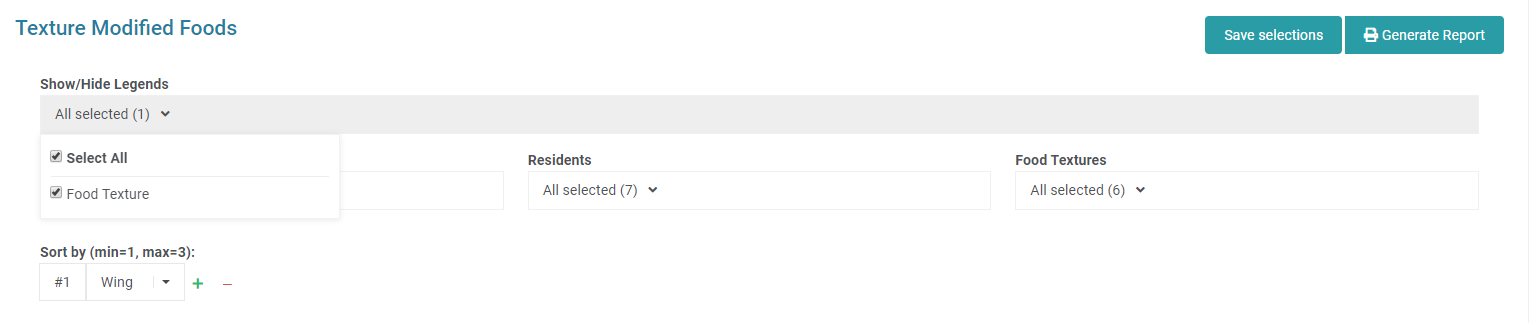
Follow these steps to download and Print the Report:
- Select Catering from the side nav.
- Click on Reports.
- Select Summaries.
- Click on Texture Modified Foods.
- Make any selections from the options listed above.
- Click Generate Report.
- Click on the downloaded PDF to View and Print.
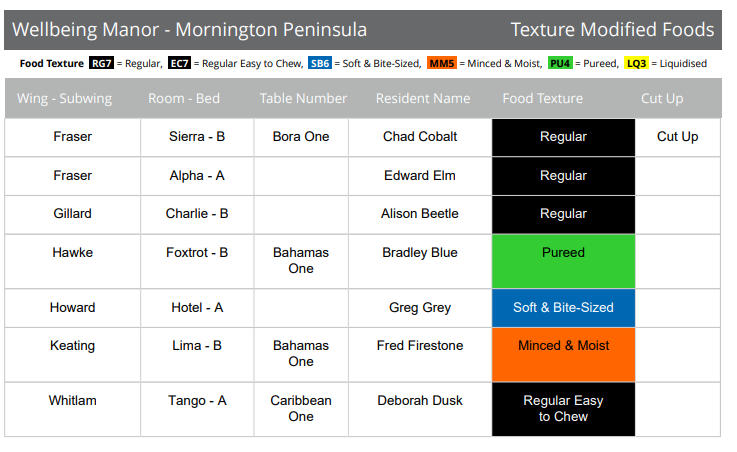
Was this article helpful?
That’s Great!
Thank you for your feedback
Sorry! We couldn't be helpful
Thank you for your feedback
Feedback sent
We appreciate your effort and will try to fix the article