Who should use this article?
Site Administrators.
Overview
Areas represent physical locations within your organisation where Food Safety activities take place.
Examples of Areas include:
- Main Kitchen
- Cool Room
- Dry Store
- Dining Room
- Satellite Kitchen
- Servery
- Dishwashing Area
Areas are used throughout the Food Safety Program and can be assigned to equipment, task lists, forms and reporting activities.
Creating an Area
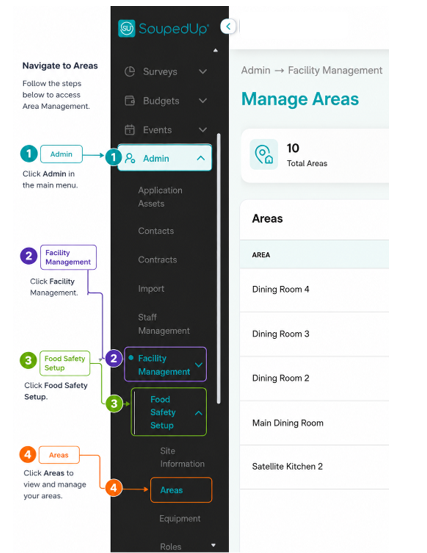
Navigate to Food Safety > Areas.
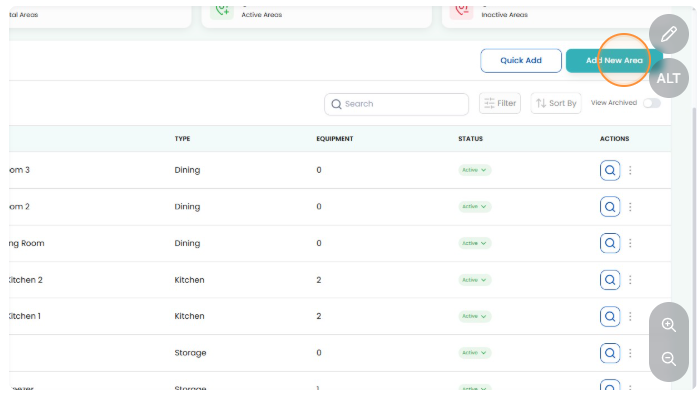
Select Add Area.
Create New Area
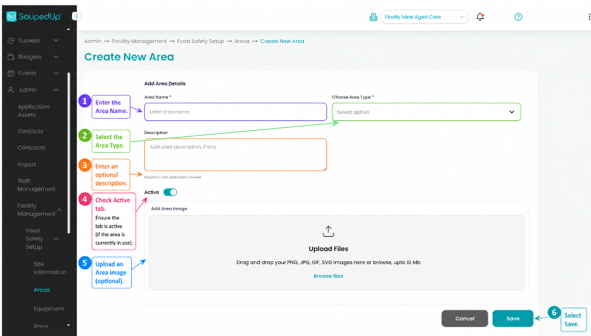
Step 1
Enter the Area Name.
Examples include:
- Main Kitchen
- Cool Room
- Dry Store
- Dining Room
Step 2
Select the Area Type.
The options being
- Dining
- Kitchen
- Other
- Preparation
- Storage
Step 3
Enter an optional description for the Area.
Descriptions can be used to provide additional information about the purpose or location of the Area.
Step 4
Review the Active toggle to determine whether the Area should be available for use within the Food Safety Program.
- Active should be selected if the Area is currently operational and in use.
- Inactivecan be used for Areas that are:
- Under construction
- Being renovated
- Temporarily closed
- Out of service
- Not yet ready for operational use
Areas marked as inactive will remain in the system but may not be available for assignment to operational activities until reactivated.
Step 5
Upload a clear photo of the Area.
Images help staff quickly recognise the correct location when completing operational, cleaning and food safety activities.
This is particularly useful in larger sites with multiple kitchens, dining rooms or preparation areas.
Step 6
Select Save.
The new Area will now be available throughout the Food Safety Program.
Result
The Area has been successfully created and can now be assigned to:
- Equipment
- Task Lists
Good to Know
It is recommended that Areas reflect the physical layout of your organisation.
For example, instead of creating a single Area called "Kitchen", consider creating separate Areas such as:
- Main Kitchen
- Cool Room
- Dry Store
- Dishwashing Area
- Servery
This can improve reporting accuracy and make Food Safety activities easier to manage.
Adding photos of your Areas is recommended.
Images make it much easier for new staff and relief staff to identify the correct Area when completing Food Safety tasks. They can also assist during audits by providing a visual reference of your site configuration.
Related Articles
Was this article helpful?
That’s Great!
Thank you for your feedback
Sorry! We couldn't be helpful
Thank you for your feedback
Feedback sent
We appreciate your effort and will try to fix the article