Who should use this article?
Site Administrators.
Overview
Equipment is used throughout the Food Safety Program to support temperature monitoring, operational activities and compliance reporting.
Examples of Equipment include:
- Refrigerators
- Freezers
- Cool Rooms
- Walk in Freezers
Adding equipment allows Food Safety activities, temperature records and reports to be linked to specific equipment items.
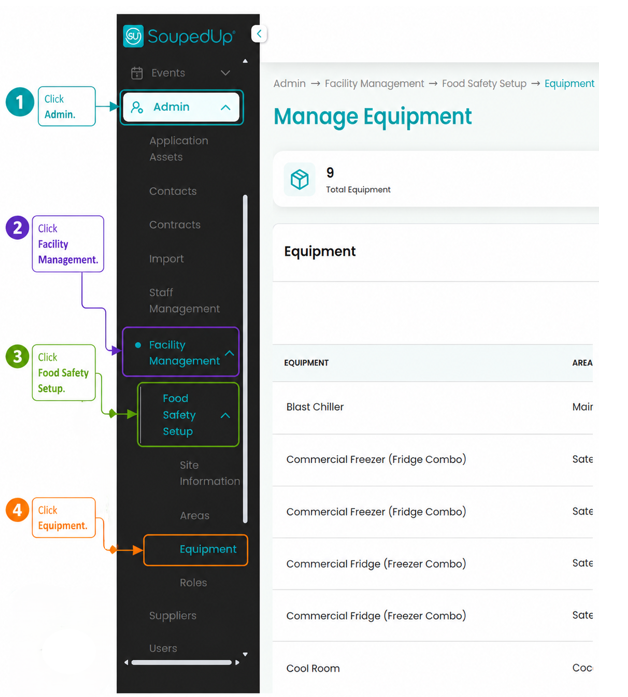
Navigate to Equipment
Navigate to:
Admin → Facility Management → Food Safety Setup → Equipment
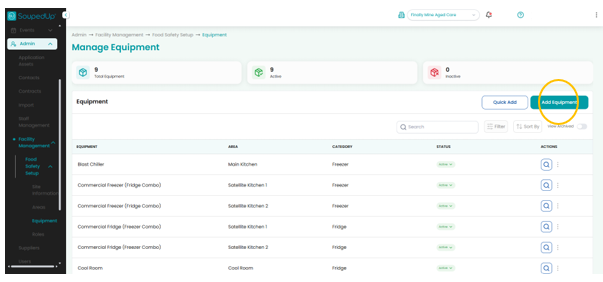
Add New Equipment
From the Equipment screen, select Add New Equipment.
Complete Equipment Details
Complete the required fields as shown below.
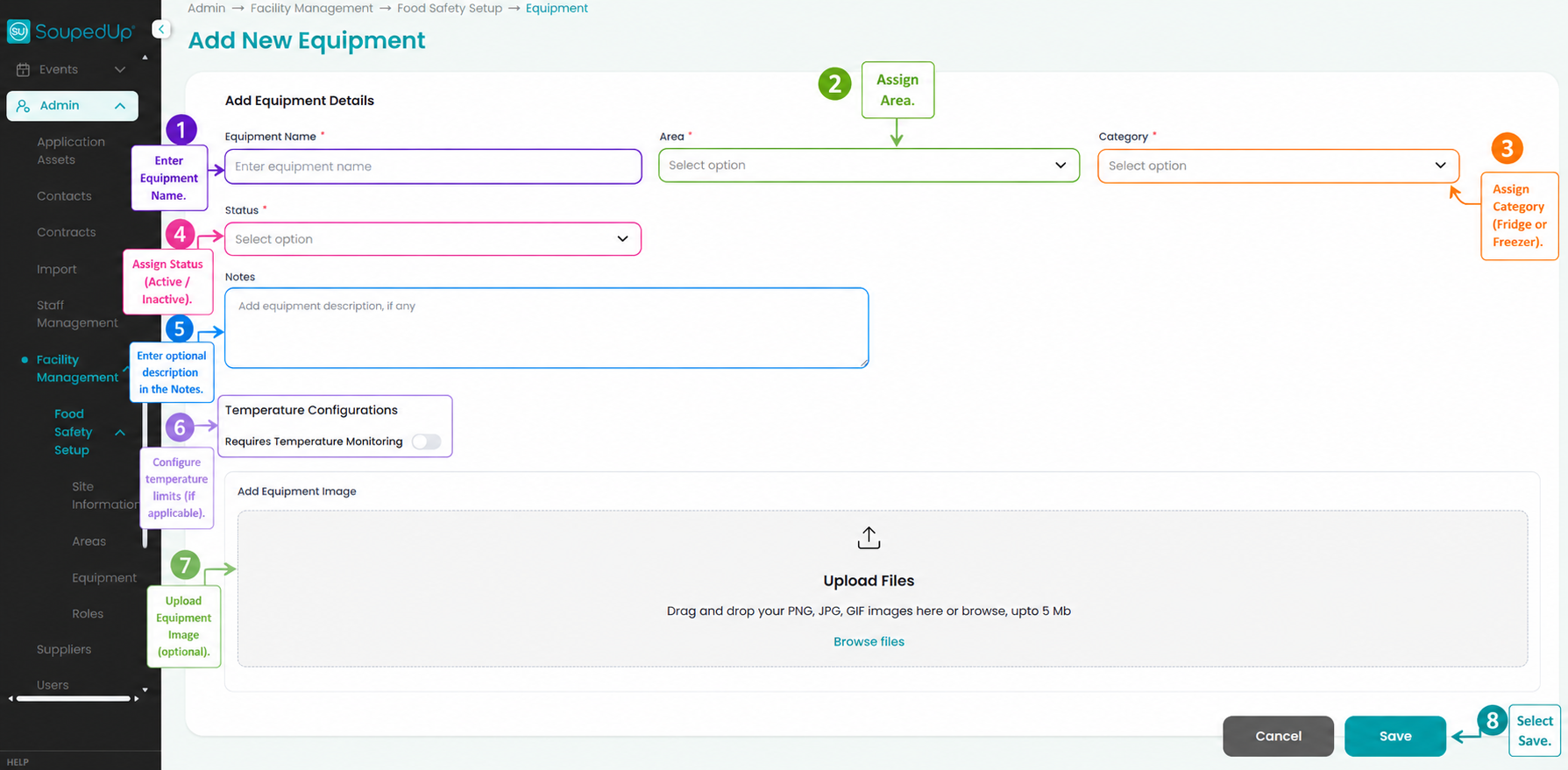
Step 1 - Enter Equipment Name
Enter a clear and descriptive Equipment Name.
Examples include:
- Main Kitchen Cool Room
- Dining Room Fridge
- Satellite Kitchen Freezer
- Blast Chiller
Using clear naming conventions makes equipment easier to identify when completing Food Safety activities and reviewing reports.
Step 2 - Assign Area
Select the Area where the equipment is located.
Areas help organise equipment and improve visibility across reporting and compliance activities.
Examples include:
- Main Kitchen
- Cool Room
- Satellite Kitchen
- Dining Room
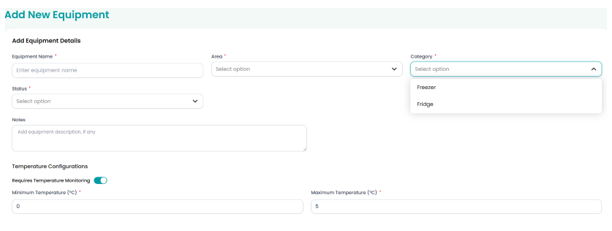
Step 3 - Assign Category
Select the Equipment Category that describes the equipment being added.
Examples include:
- Fridge
- Freezer
Equipment categories help support reporting and temperature monitoring activities. And will provide you with the pre-set temperature monitoring as per FSANZ Standards.
Step 4 - Assign Status
Select the appropriate Equipment Status.
- Active should be selected if the equipment is currently in use.
- Inactivemay be used for equipment that is:
- Out of service
- Under repair
- Being replaced
- Not yet commissioned
Inactive equipment remains available for historical reporting purposes but may not be available for operational use.
Step 5 - Enter Notes (Optional)
Enter any additional information relevant to the equipment.
Examples may include:
- Equipment location details
- Operational instructions
- Maintenance information
- Special monitoring requirements
This field is optional and can be updated at any time.
Step 6 - Configure Temperature Monitoring
Enable Requires Temperature Monitoring if the equipment requires routine temperature recording.
This will automatically be activated when the Category is selected
Step 7 - Upload Equipment Image (Optional)
Upload a clear photo of the equipment.
Adding an image helps staff quickly identify the correct refrigerator or freezer when completing temperature checks, particularly where multiple pieces of similar equipment exist.
Images also improve site familiarisation for new staff, agency staff and auditors.
Step 8 - Save Equipment
Select Save to create the Equipment record.
The equipment will now be available throughout the Food Safety Program.
Result
The Equipment has been successfully added and can now be used within:
- Temperature Monitoring
- Reports
- Compliance Activities
Good to Know
It is recommended that Equipment names clearly identify both the equipment type and its location.
For example:
✔ Main Kitchen Cool Room
✔ Dining Room Fridge
✔ Satellite Kitchen Freezer
Instead of:
✘ Fridge 1
✘ Freezer A
Clear naming conventions and equipment images make equipment easier to identify when completing Food Safety activities and reviewing reports, for both staff and Auditors.
Related Articles
Was this article helpful?
That’s Great!
Thank you for your feedback
Sorry! We couldn't be helpful
Thank you for your feedback
Feedback sent
We appreciate your effort and will try to fix the article