Who should use this article?
Head Office Food Safety Program users.
Overview
The Food Safety Dashboard provides a central view of Food Safety activities across your organisation.
Information displayed on the dashboard is populated from activities completed within the Food Safety Program, allowing Head Office users to monitor compliance, identify issues and review operational performance across sites.
Accessing the Dashboard
- Log into SoupedUp.
- Select Food Safety from the left-hand navigation menu.
- The Food Safety Dashboard will open.
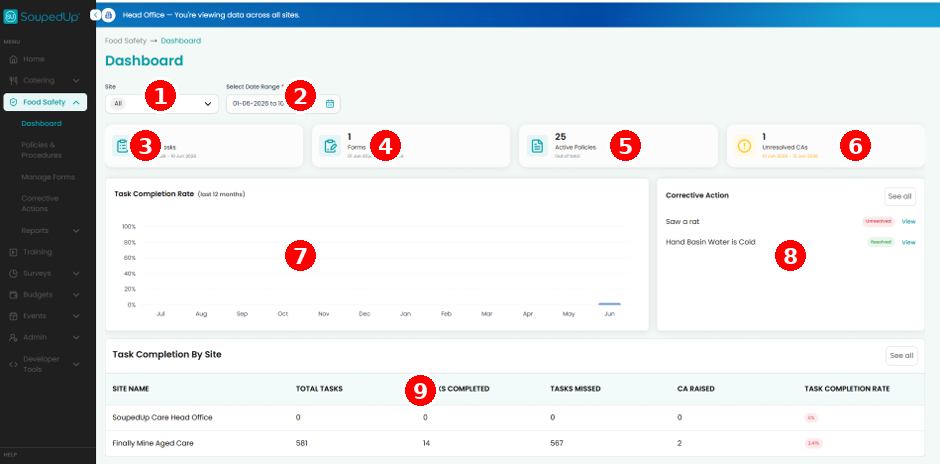
Understanding the Dashboard
| No. | Dashboard Component | Description |
|---|---|---|
| 1 | Site Filter | Filter dashboard information by site or review information across all available sites. |
| 2 | Date Range | Select the reporting period to review Food Safety activities and compliance information. |
| 3 | Active Tasks | Displays the total number of Food Safety tasks generated during the selected reporting period. |
| 4 | Forms Submitted | Displays the total number of forms completed and submitted by users. |
| 5 | Active Policies | Displays the number of published policies and procedures currently available within the Food Safety Program. |
| 6 | Unresolved Corrective Actions | Displays corrective actions that require review, investigation or completion. |
| 7 | Task Completion Rate | Provides a visual summary of task completion performance over time. |
| 8 | Corrective Actions Panel | Displays recently raised corrective actions and their current status. |
| 9 | Task Completion by Site | Compares task completion performance across participating sites, including completed tasks, missed tasks and corrective actions raised. |
Where Does Dashboard Information Come From?
Information displayed on the dashboard is generated from activities completed throughout the Food Safety Program, including:
- Operational Tasks
- Cleaning Tasks
- Temperature Monitoring Records
- Corrective Actions
- Forms
- Policies & Procedures
- Compliance Activities
As users complete activities within the Food Safety Program, the dashboard updates to provide a current view of Food Safety performance and compliance status.
Why Is The Dashboard Important?
The dashboard allows Head Office users to:
- Monitor Food Safety activities across multiple sites
- Review task completion performance
- Identify overdue or missed activities
- Monitor corrective actions
- Review compliance trends
- Support site teams
- Prepare for audits and compliance reviews
Good to Know
The information available on the dashboard is determined by your assigned permissions.
Head Office users may have visibility across multiple sites.
Related Articles
Was this article helpful?
That’s Great!
Thank you for your feedback
Sorry! We couldn't be helpful
Thank you for your feedback
Feedback sent
We appreciate your effort and will try to fix the article